
B07Kitchen and pantryMoney under controlDIYOn the road
Shopping list
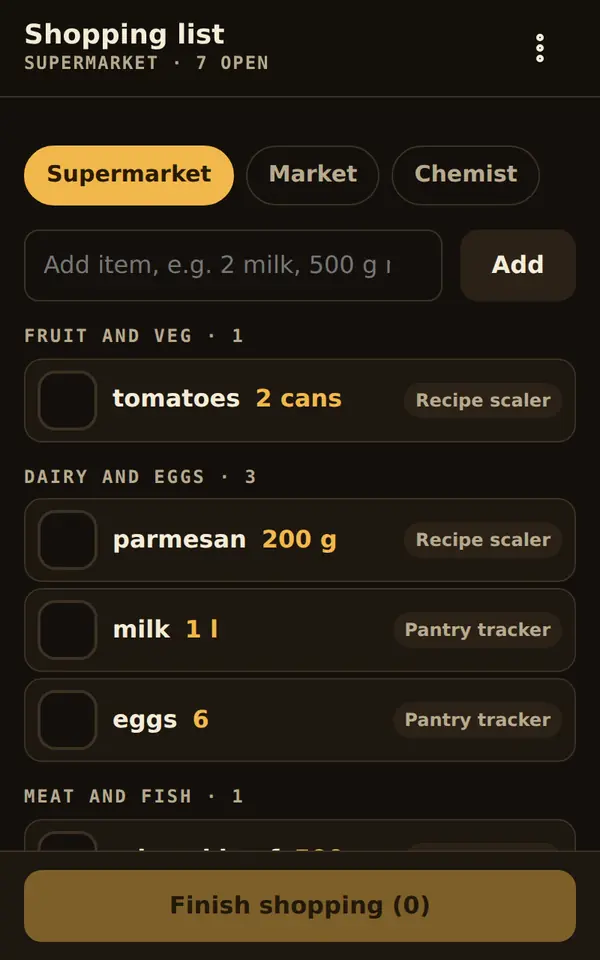
In the shop every item is in the order of the aisles.
Who it is for: For anyone who wants to shop without walking through the store three times – alone or as a family.
The tool runs isolated on this page. Whatever you enter here is kept only until you reload.
What it does
- Sorted by the aisles of your shop, and it learns along the way
- Wishes from several tools are merged, amounts added up
- Several shops, for example supermarket, market, chemist
- Finishing reports the shopping to the pantry tracker and budget book
Starter templates
On first start you choose what to begin with. Everything can be changed later under “Customize”.
- Supermarket
- Nine aisles from fruit to the freezer. Recipe scaler, pantry tracker and packing list add to the list themselves.
- Market
- Stalls instead of aisles; no amount at the end, because markets are often cash.
- Family list
- One list for everyone: whoever gets it shared shops from the same list. The total goes to the budget book.
Working together
After one tap the tool passes data to other tools. The toolbox asks once for your permission.
Sends to
- Pantry trackershopping items
- Budget bookamounts
Receives from
- Pantry trackershopping items
- Recipe scalershopping items
- Material calculatorshopping items
- Packing listshopping items
How a tool gets into your toolbox
Download
Tap “Download” on the tool’s page. Every file is smaller than 90 KB.
Add
In the toolbox choose “File or download” and pick the file. On Android this works too: open the download, tap “Share” and choose “Artefakt Toolbox”.
Start
On first start you choose a starter template. Everything else is set under “Customize”, without any code.
Connect if you like
When a tool sends something to another, the toolbox asks once for your permission for exactly this pair.
Planned: choose tools right in the app and add them with one tap.
Change with AI
This template is in the tool’s help. Copy it into “Change with AI” and add your wish.
Add a shop “Organic shop” with the aisles Veg, Bread, Dairy, Dry goods, Checkout and make it the default.Checked
The tool passed the automatic check: no network access, no obfuscated code, no access to camera, microphone or location. With the checksum you can verify that your file is exactly this one.
- Version
- 1
- Updated
- October 4, 2026
- Size
- 71 KB
- Network
- none, works offline
- SHA-256
6ac97b0855b75afa6fde126aeb299a20b935dd8d928c18b88b66735614992cd6
Catalogue as JSONMore on security and trust
Report a problemDoes the tool behave wrongly? Report it with name, version and checksum.
Goes well with
Bundle: Kitchen and pantry
Lasagne for nine: the recipe scaler converts the amounts and puts the times into the kitchen timers. Whatever is missing goes onto the shopping list – together with what the pantry tracker reports as low. After shopping the pantry is green again and the amount is in the budget book.
Bundle: Money under control
The subscription radar shows which contracts renew soon and adds the monthly total to the budget book as fixed costs. Shopping is booked into the right pot after one tap. One glance shows what is left this month.
Bundle: DIY
Measure the room, choose the material: the material calculator finds the cheapest packs, puts them on the shopping list and notes the costs in the budget book.
Bundle: On the road
The packing list calculates by days and people and sends whatever is missing to the shopping list. The emergency card shows helpers the essentials – in their language and without any link to the outside.
-
C01
Subscription radar
The yearly total of all subscriptions in large digits – and below it, what must be cancelled by when.
-
L01
Packing list
“Beach + kids + flight, 9 days” gives the whole list in seconds, with the right amounts.